
The short answer
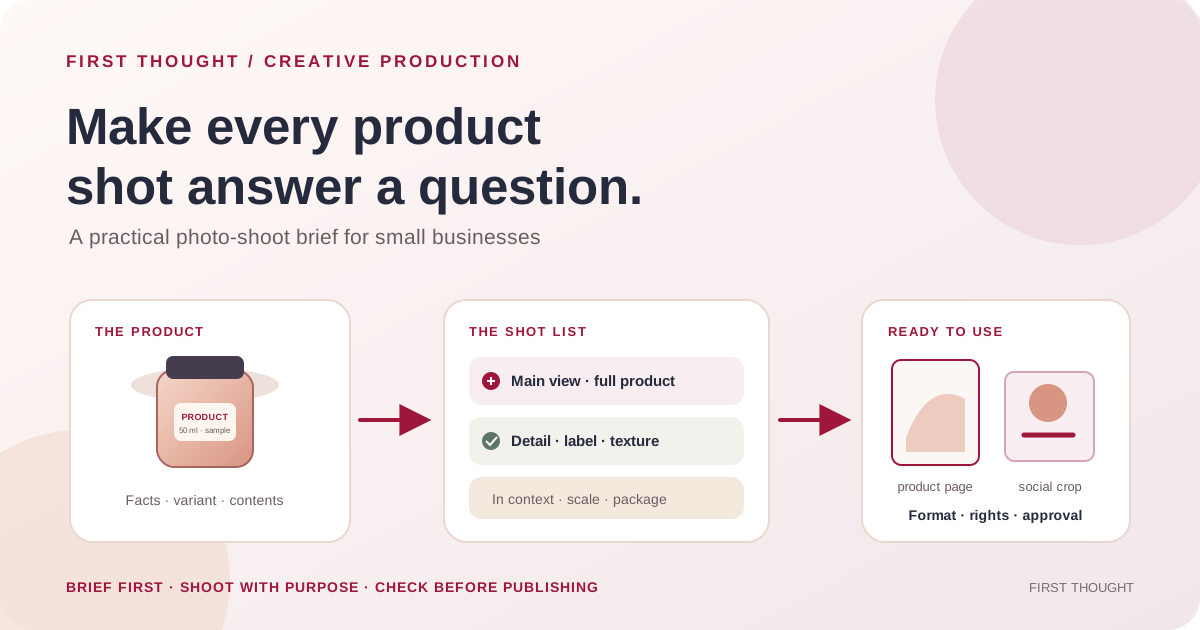
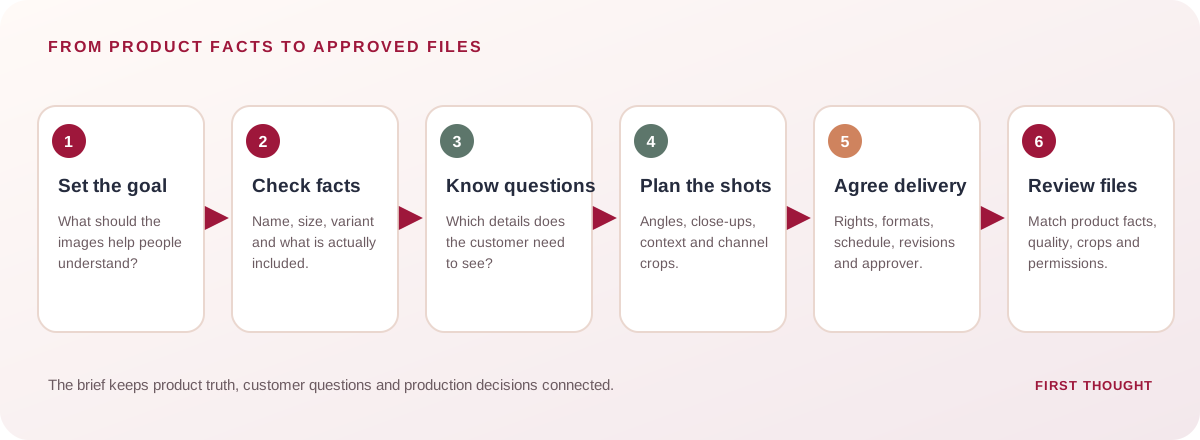
A product photography brief is a short working document that tells the photographer what the product is, who needs to understand it, where the images will appear, which views are needed, what must remain accurate, and how files will be delivered and approved. A useful brief connects the business goal to a specific shot list and a practical delivery checklist. It prevents a shoot from producing attractive images that do not show the product detail, context or format a customer needs.
Use the copyable template below before the shoot. Keep product facts and claims accurate, confirm permission for people and locations shown, and check the current requirements of each destination before exporting. A brief improves coordination; it cannot guarantee sales or advertising results.
Contents
- What a product photography brief does
- The copyable brief template
- How to build a useful shot list
- Match each image to its destination
- A worked example for a fictional small brand
- DIY versus hiring a product photographer
- DIY product photography setup at home
- How many product photos do you need?
- Product image SEO, GEO and AEO basics
- File handoff for product photos
- Pre-shoot and delivery checks
- Common mistakes
- Frequently asked questions
- A practical next step
What a product photography brief does
A brief gives the owner, photographer and marketing team one reference before production. It connects product facts, customer questions and image destinations, while recording variants, props, usage rights, deliverables and the final approver.
The brief is not a guarantee that every platform will accept an image, and it is not a substitute for product-feed or advertising specifications. Requirements can differ by channel and change over time. Treat the destination list in the brief as a prompt to check the current specification before export.
For a small business, the value of a product photoshoot brief is practical: it turns a vague request for “nice photos” into a list of images, facts, formats and approvals. That applies whether you search for a product photography brief template, prepare a product photoshoot brief for a freelancer, or organize an in-house shoot for an online store. Keep one primary job for each image and write down the customer question it answers.
Copyable product photography brief template
Copy this table into a document or spreadsheet. Use one row per product or shoot where the details differ.
Download the Download the copyable product photography brief template if you want to fill it out in a spreadsheet.
| Brief field | What to write | Example prompt |
|---|---|---|
| Project and owner | Shoot name, decision-maker and day-to-day contact | Who can answer product questions and approve the files? |
| Business goal | The decision this shoot should support | Show the new range clearly on product pages |
| Product facts | Exact name, variant, material, size, finish and included items | What is in the box? Which color or size is being photographed? |
| Audience and question | Who is viewing, and what are they trying to confirm? | Can I see the fabric texture and how the bag closes? |
| Destination | Where each image will appear | Product page, catalog, social post, email or print |
| Required shots | Image subject, angle, crop and purpose | Front view, back view, detail, scale and in-use image |
| Visual direction | Background, lighting, props, palette and reference links | Neutral background; natural light; no props that imply included extras |
| Accuracy and claims | What must be shown exactly; wording or claims that need approval | Do not imply a material or accessory that is not included |
| People, location and permissions | Releases, location approval, brand permission and privacy notes | Confirm the model release and location permission before the shoot |
| Deliverables | Number, dimensions, format, crop variants, naming and delivery location | Confirm platform sizes and provide web-ready files plus agreed masters |
| Rights and usage | License, channels, territory, duration, editing and credit | Record the agreed uses in writing before production |
| Schedule and budget | Shoot date, review dates, fee, props, travel and revisions | Confirm what is included and the cost of extra revisions |
| Approval and final QA | Approver, factual checks, color/retouch review and sign-off | Compare each final image with the real product and approved brief |
Do not leave critical fields as “make it look good.” Replace broad taste words with observable direction: “soft side light, warm neutral background, product fully visible, label legible” is easier to act on than “premium and aesthetic.” Reference images can explain mood or framing, but identify what you want to borrow and what must remain original to your product and brand.
How to build a useful product photography shot list
Start from customer questions, then assign each requested photograph one job. The list below is a planning framework, not a rule that every product needs every shot.
| Shot type | Customer question it can answer | Brief notes |
|---|---|---|
| Main product view | What exactly is being sold? | Show the complete product clearly; keep the crop and background suitable for the destination |
| Alternate angle | What does the product look like from another side? | Name the front, back, side, open or assembled view needed |
| Detail close-up | What is the texture, finish, closure or workmanship? | Identify the feature and keep the detail in focus |
| Scale reference | How large is it in a real context? | Use a truthful scale cue; include a person only with permission |
| In-use or lifestyle image | How does it fit into a real setting or routine? | Do not imply accessories or features are included when they are not |
| Packaging and contents | What arrives with the order? | Show only the components actually included |
| Variant image | How do colors, sizes or models differ? | Confirm each photo matches the correct variant |
| Instructional or comparison graphic | How do I choose or use it? | Keep essential text available as page text too; check any claim before publication |
For each line, record the product variant, orientation, intended crop, required detail and destination. If one photograph must serve several placements, ask whether important edges or label text could be cropped on a small screen. Where a platform uses a dedicated product image feed, check that platform's specifications separately rather than assuming a social-media crop is suitable.
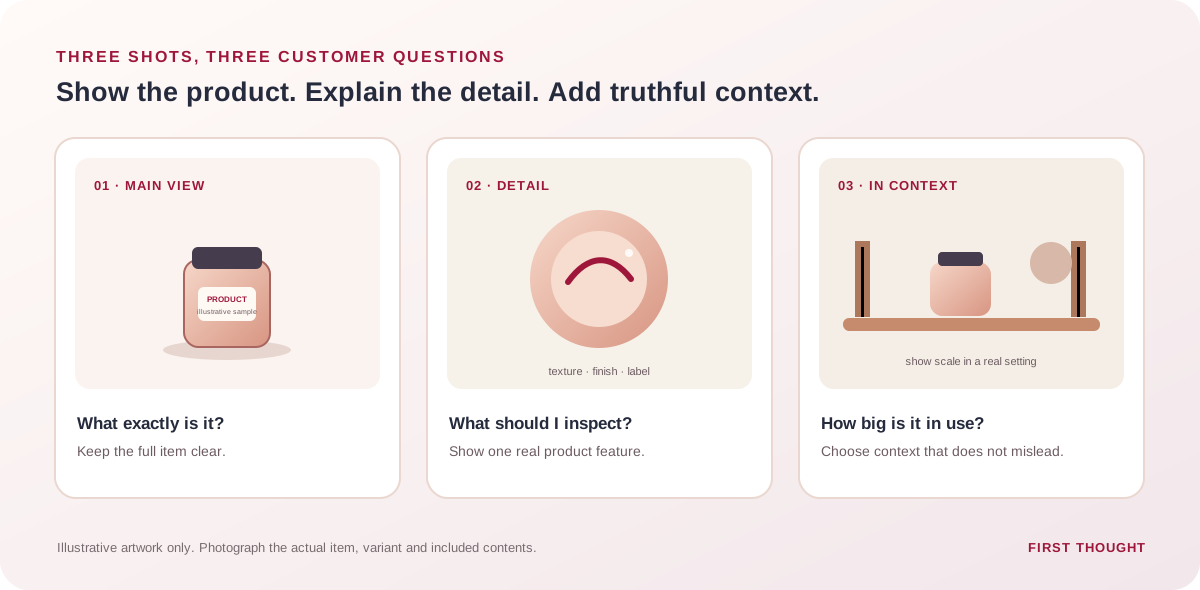
These are planning illustrations, not photographs of a First Thought client or a real product. Use them to decide what each shot needs to communicate; photograph the actual product, variant and included contents.
Google Merchant Center distinguishes the main product image from additional and lifestyle images. Its current guidance for product listings discusses clean, clear images, alternative views and detail/lifestyle imagery; it also specifies image URL and file requirements. These are Merchant Center requirements and recommendations, not universal rules for every photo, site or social post. Confirm the current rules for the feed and category before delivery. Google Merchant Center: image link · Google Merchant Center: image best practices
Match the images to their destinations
Write a destination next to each requested image. That small step can prevent avoidable recropping or missing views later.
| Destination | Planning question | Useful brief detail |
|---|---|---|
| Product detail page | Which views and details help a shopper assess this item? | Product variants, close-ups, packaging and any required mobile crops |
| Product listing or feed | What does the destination require for the primary and additional images? | Current image dimensions, supported format, URL accessibility and policy checks |
| Organic social | What should be legible in the feed or story placement? | Vertical/square/wide crop versions, safe areas and text supplied separately where possible |
| Paid creative | What is the ad promise and which visual supports it? | Approved offer, product variant, destination and any required disclaimers |
| Which image remains understandable at the likely display size? | Crop, file size, destination link and fallback text if the image is unavailable | |
| Print or packaging | What resolution, color and bleed requirements apply? | Confirm with the printer or packaging vendor before shooting/export |
Google Search Central recommends descriptive, useful alt text and placing images near relevant content. It also advises against keyword-stuffed alt attributes. For accessibility, W3C distinguishes informative images from decorative ones; a meaningful product image should have a concise text alternative describing the information it contributes, while a decorative image may use empty alt text. Google image SEO best practices · W3C image alt decision tree
Worked example: a fictional small skincare brand
Imagine a fictional business launching a 50 ml face moisturizer in glass packaging. A brief could say:
- Goal: Create accurate product-page images for the new item and a separate set of organic social crops.
- Audience question: What does the container look like, how large is it, and what arrives with the order?
- Product facts: 50 ml jar, exact label artwork supplied by the business, lid included; confirm ingredients and any claims from the approved product label.
- Shot list: Main closed jar, back label, lid removed, texture close-up if safe and accurate, scale view in a bathroom setting, and package contents.
- Visual direction: Soft neutral background and gentle side light; do not add text, badges or claims to the product image itself unless the destination's current policy permits them.
- Deliverables: Product-page images plus square and vertical social crops. The business confirms the platform-specific dimensions and file types before export.
- Approval: Owner checks that the label, product amount, packaging and included items are represented accurately before files are published.
This fictional example is not First Thought client work and makes no sales claim.
DIY versus hiring a product photographer
Choose based on complexity, repeatability, available skills and budget. This table is a decision aid, not a quality guarantee.
| Consideration | In-house / DIY may fit when… | Hiring a photographer may fit when… |
|---|---|---|
| Product range | There are few products and simple, repeatable views | There are many variants, reflective surfaces or complex styling needs |
| Frequency | Images need occasional updates by a small team | The brand needs a repeatable, larger batch or seasonal production |
| Control | The team can reliably match color, light and framing | Consistency, specialist lighting or advanced retouching is important |
| Equipment and space | A suitable camera/phone, light and clean space are available | Product scale, material or shoot environment needs specialist setup |
| Time | Someone can prepare products, shoot, select and edit files | Staff time is better spent on other work and the budget supports production |
| Rights and handoff | The team can organize files and record permissions | The project needs a written scope, usage terms and clear delivery agreement |
Before hiring, confirm what the fee includes: pre-production, props, models, location, retouching, number of final images, revision rounds, delivery schedule and usage rights. Before shooting in-house, test one product and one destination crop, then compare the result with the real item. Either route benefits from the same brief.
DIY product photography setup at home
A useful DIY product photography setup does not begin with a long gear list. Start with the product, the destination and one repeatable light source. A recent phone or camera can be enough for a simple product if the image is in focus, the color is believable, the product is clean and the camera stays steady. More equipment cannot correct a brief that asks for the wrong view.
A simple tabletop setup
- Choose a stable surface and background. Put the product on a clean table near a large window. Use a neutral paper or cloth backdrop that does not compete with the product. Sweep it upward behind the item when you want a continuous background.
- Use one main light direction. Start with window light from one side. If the shadow is too dark, place a white card or foam board on the opposite side to reflect some light back. Avoid mixing daylight with a differently colored room lamp; mixed lighting can make product color harder to judge.
- Stabilize the camera. Wipe the lens, use a tripod or steady support, and tap to focus on the important product detail. Keep the camera level for a straightforward hero view. Take a test frame and inspect it at full size before repeating the setup across variants.
- Control reflections. Glossy jars, glass, metal and plastic reflect the room as well as the light. Move the light or camera a little, use a larger soft light source, and keep distracting room shapes out of the reflection. A polarizing filter or specialist setup may help for challenging materials, but do not buy gear until a simple test identifies the problem.
- Photograph the real item and variant. Check the label, color, size, finish, included parts and packaging. Label samples before a batch shoot so the image file does not get attached to the wrong product variant.
- Capture the planned views. Make the main product photo first, then the alternate angle, detail, scale, in-use or package-content image that the brief calls for. Keep props separate from what is actually included in the purchase.
These product photography tips for small business owners are a starting point, not a promise that a phone setup will suit every item. Transparent, reflective, very small or highly detailed products can need specialist lighting, macro equipment or post-production. Test one representative product before deciding how to shoot the full range.
A repeatable DIY photography checklist
Before each session, charge the device, clean the lens and product, prepare the approved background and props, and confirm which variant is being photographed. Keep the camera height, light direction and product position consistent for similar items. Capture a reference frame when the setup is correct so the next session can reproduce the look. Review focus, label legibility, crop space, color and product accuracy before moving on. Save the source files until the business has approved the final exports.
This approach makes a basic product photography lighting setup at home more repeatable: one main light, a simple reflector, a fixed camera position and a written shot list. If the product needs more complex control, take the test frames to a photographer and explain what failed; that gives the production conversation a concrete starting point.
How many product photos do you need?
There is no useful universal image count for every product, page and channel. The practical question is whether the set answers the decisions a customer needs to make: what the product is, what it looks like from another side, which detail matters, what arrives in the package, how large it is, and what a real use context looks like.
For merchants using Google Merchant Center, Google's current image best-practices page recommends at least five additional images and supports up to ten supplementary image URLs. It describes alternate angles, detail images and lifestyle context; this is Merchant Center-specific guidance, not a rule for every online store, social post or email. Check the current feed requirements for the product category and format before delivery. Google Merchant Center image best practices · Image link and format requirements
Use a short decision list rather than shooting several nearly identical frames: (1) the primary product view; (2) a distinct alternate angle; (3) the detail buyers inspect; (4) truthful scale or use context; (5) packaging or included contents where relevant; and (6) a variant-specific image when color, model or finish changes. Add another shot only when it answers a separate customer question or a destination explicitly calls for it. The number and order should match the item and its publishing destination.
Product image SEO, GEO and AEO basics
There is no separate magic “AEO keyword” that makes a product image or blog rank in AI answers. For Google AI Overviews and AI Mode, Google says existing SEO fundamentals remain relevant and that no additional requirements or special optimizations are needed. Google recommends making important information available as text and supporting it with high-quality images where they help. Eligibility still depends on the page being indexed and eligible for a Search snippet; inclusion is not guaranteed. Google Search Central: AI features and your website
For ordinary search and image discovery, place each useful image near the section it explains. Use a short descriptive filename, a concise alt description for informative images, a caption when readers need context, and nearby visible text that explains what the image demonstrates. Google's image guidance says alt text helps it understand image subject matter alongside computer vision and page content; it also warns against stuffing alt attributes with keywords. Google Images SEO best practices
This gives the article natural topical language—such as product photography brief template, ecommerce product photography shot list and product photography checklist for small business—in places where the reader expects it: the title, opening, descriptive headings, practical steps and FAQs. Do not repeat those phrases in every image description. Give each visual a useful purpose, keep the main guidance in text as well, and link internally to relevant production or content-planning pages. These choices make the guide clearer and easier to interpret; they do not guarantee rankings, AI citations or traffic.
File handoff for product photos
Agree on delivery before the shoot. Ask for original/source files and final web-ready exports only if they are part of the written scope. Specify the file format and crop versions required by each channel, plus a naming pattern that ties each image to its product and view. For example, a file name could combine the business's SKU, variant and angle; use the real SKU system rather than copying this illustrative format. Keep one approved master and label social or campaign crops clearly so they are not mistaken for the feed's main product image.
Before upload, open the files, verify that the public page can load them, and compare each image with the right variant and package contents. Keep captions and alt text factual. If you use generative imagery in a Merchant Center product feed, review the current Google policy and preserve the required image metadata; a synthetic lifestyle scene must not misrepresent the real product. Google's current documentation requires generative-AI metadata for images submitted to Merchant Center and prohibits generic graphics as a replacement for the actual product photo. Google Merchant Center image link requirements
Pre-shoot and delivery checks
Before the shoot
- Confirm product names, variants, dimensions, package contents and label details with the person responsible for the product.
- Clean and prepare the physical item; bring backups for fragile, reflective or food products where appropriate.
- Confirm the shot list and which shots are essential versus optional.
- Check locations, props, people, logos and reference-image permissions.
- Confirm the schedule, budget, revision scope, license and delivery method in writing.
- Review each publishing destination's current image and advertising requirements.
Before accepting final files
- Compare color, material, scale, packaging, label and product variant with the actual item and approved facts.
- Check focus, exposure, crop, edge space and any requested detail.
- Confirm the files open, use the agreed names and formats, and are stored in the shared delivery location.
- Check the required crops at the intended display sizes; do not rely on a single desktop preview.
- Confirm that all people and locations have the required approvals, and that the business has the agreed usage rights.
- Write useful alt text for informative images when publishing on the website. Keep essential product information in page text as well; an image should not be the only place a critical fact appears.
Common mistakes to avoid
- Starting with “make it viral.” A photo shoot needs a specific customer or business task before choosing a look.
- Requesting only one hero image. Product pages and other destinations may need different angles, details or contexts.
- Using vague style words alone. Add references, lighting, backdrop, crop and product-accuracy notes.
- Photographing the wrong variant. Label products and sample images clearly before and during the shoot.
- Showing something that is not included. Identify props and accessories so customers are not misled.
- Forgetting usage rights. Agree where, how long and in what formats the final images can be used.
- Assuming one export works everywhere. Check current destination requirements before delivery.
- Putting important information only inside a graphic. Keep product facts, instructions and material details as accessible text where they matter.
- Treating a better-looking image as proof of better sales. To evaluate business impact, record the change, the comparison period and the outcome separately; do not infer causation from appearance alone.
Frequently asked questions
What should a product photography brief include?
Include the goal, product facts and variants, audience questions, destinations, shot list, visual direction, accuracy constraints, permissions, deliverables, rights, schedule, budget, approvals and final checks.
How many product photos should I plan for?
There is no universal count. List the buyer questions and check the image requirements for each destination. For Merchant Center listings, follow its current main/additional image guidance.
Should I use a white background or lifestyle photos?
Decide by destination and customer question. A clean background can make the item easy to inspect; an in-context photo can show scale or use. Check current channel rules and keep the product clear.
What image size should I request?
Ask each destination for its current dimensions and file requirements. Agree on a master file and required crops with the photographer. Merchant Center guidance applies to its own listings, not every channel.
Can I use a phone for product photography?
Yes, for some simple products and uses, if the team can control focus, lighting, color, background and repeatable framing. Test the actual destination crop and compare the photograph with the product before publishing. Complex reflective, translucent or highly detailed products may need specialist equipment or skill.
How do I take product photos at home for an online store?
Use a clean background, soft window light, a white reflector and a stable camera or phone. Follow a short product photography shot list, photograph the actual product and variant, and check focus, color, scale and crop before uploading. Confirm the current requirements of the online store or marketplace separately.
Do product images help SEO or AI search visibility?
Useful, accessible images can support a page by showing details that text alone may not communicate, while descriptive filenames, concise alt text and relevant nearby text help search systems understand them. Google says its AI search features use the same foundational SEO practices and do not require a special AEO keyword. That does not guarantee inclusion, rankings or citations.
Should I add keywords to image alt text?
Write alt text to describe what an informative image contributes, in plain language. Include a relevant product term only when it is genuinely useful to someone who cannot see the image. Do not repeat a keyword list; Google warns that keyword-stuffed alt text creates a poor experience.
Do product images need alt text?
Informative images should have concise text alternatives that explain their relevant information. Decorative images can use empty alt text. Describe what the image contributes rather than repeating a list of search terms; use the W3C decision tree for cases that are not obvious.
A practical next step
Choose one product and fill out the brief before booking a shoot. Ask one teammate who handles customer questions to review the shot list: does it show the details customers ask about, and are the product facts unmistakable? Then verify destination requirements and rights before production. For help turning a product range into a planned content shoot, see First Thought’s content production service or contact the team.
Sources & further reading
Google Merchant Center: Image link requirements ↗Google Merchant Center: Image best practices ↗Google Search Central: Google Images SEO best practices ↗Google Search Central: AI features and your website ↗W3C WAI: An alt decision tree ↗Practical frameworks are First Thought editorial recommendations. Hypothetical examples are not client results.