
The short answer
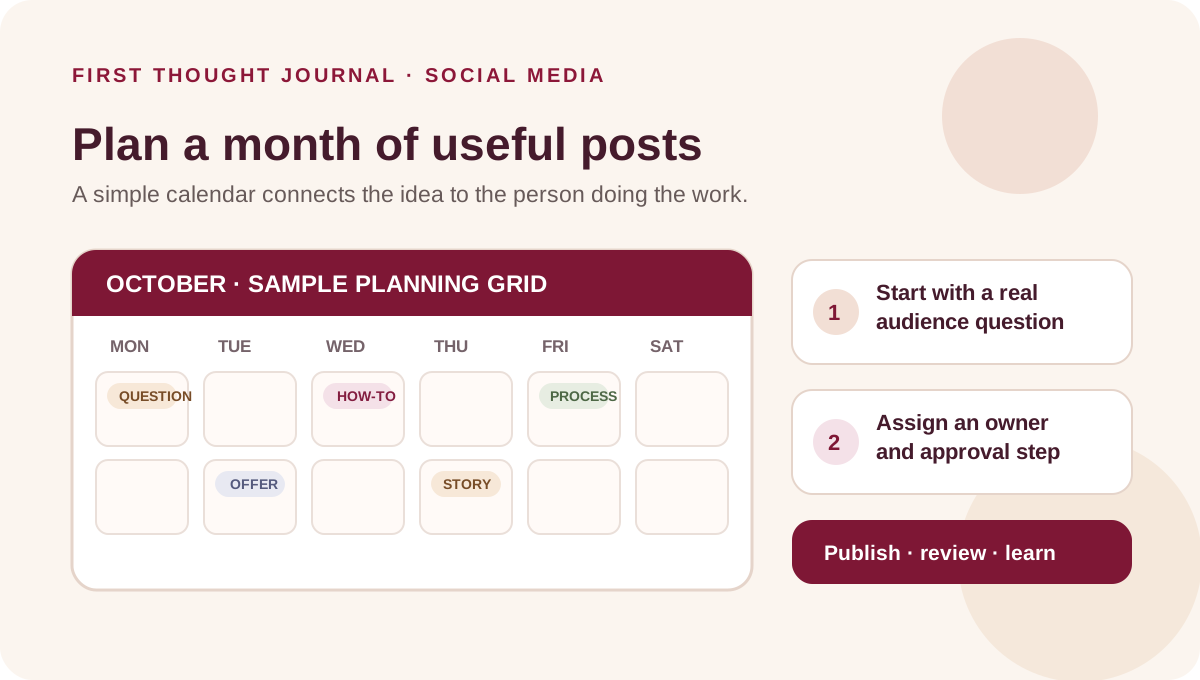
A social media content calendar is a shared plan for what a business intends to publish, on which platform, when, and who will prepare and approve it. A useful small-business social media calendar template includes the audience question, idea, format, owner, approval status, destination and a review note. Keep the plan small enough to maintain and leave room for timely updates.
The calendar coordinates work; it does not guarantee reach, engagement or sales. Use it to reduce last-minute guesswork and make every planned post easier to produce, check and learn from.
What a content calendar does—and what it does not
A calendar is the schedule and status view. A content brief explains how one post should communicate its message. The finished caption, video or graphic is the publishable asset. Keeping these jobs distinct makes it easier to see whether a post is waiting for an idea, copy, design, approval or publication.
| Tool | Question answered | Typical details |
|---|---|---|
| Content calendar | What is planned, where and when? | Date, platform, idea, owner, status and review date. |
| Content brief | What should this one post say and show? | Audience, purpose, message, verified facts, format and CTA. |
| Final post | What will the audience see? | Approved caption, image or video, link and accessibility details. |
For a ready-to-use brief, see our social media content brief template.
Start with a business priority and real audience questions
Before filling dates, choose one practical priority for the month: explain a service, answer common questions, support an upcoming event, help customers use a product, or make a clear offer. Then list questions customers actually ask in conversations, enquiry forms, support messages or sales calls. Remove identifying details before reusing a customer question publicly.
Separate observed questions from guesses. If the team assumes people are confused about delivery but has not heard that, label it as a hypothesis and test the idea with a small, useful post. A calendar should translate what the business knows into helpful communication, not manufacture an audience insight.
Choose a cadence the team can maintain
There is no universal posting frequency that suits every small business, platform, audience and production team. Select a pace the team can sustain while keeping facts, creative quality and replies under control. A plan with fewer approved posts is more useful than a crowded grid that regularly slips or publishes unfinished work.
Look at the next month’s actual capacity: who can write, make visuals, film, review, respond to comments and update links? Include holidays, inventory or service availability changes only when confirmed. Leave a few unassigned slots for timely questions or business updates. Treat the calendar as adjustable rather than a contract to publish every cell.
Pick a few content pillars to guide ideas
Content pillars are recurring subject areas that make planning easier. A local service business might use customer education, process explanations, team expertise, frequently asked questions and service information. A retailer might use product care, use cases, availability, customer questions and seasonal information. Choose pillars that come from the business’s real expertise and customer needs.
A pillar is a prompt, not a quota. Do not force every business into an “80/20” ratio or a fixed number of promotional posts; those rules are often presented without evidence for a particular audience. Review whether each idea has a reason to exist and whether the mix reflects what the business can honestly say.
Copy-and-use social media content calendar template
Use one row for each planned post on each platform. If the same idea needs two different executions, give each execution its own row and connect them with a campaign or idea label.
| Column | What to record |
|---|---|
| Publish date | Planned date; include time only if it has a reason and is confirmed. |
| Platform | The specific account or channel where this version will appear. |
| Audience question | The real question or situation this post addresses. |
| Pillar and purpose | Topic area and one main job: explain, demonstrate, inform, invite or support. |
| Format and working idea | Carousel, short video, story, static post or another suitable format; summarize the idea. |
| Evidence and asset source | Link to approved facts, product information, photography, brief or source material. |
| CTA and destination | The next step and exact link, contact route or page. |
| Owner and reviewer | Who prepares the post and who checks its facts, rights and final copy. |
| Status | Idea, briefed, in production, awaiting review, approved, scheduled, published or held. |
| Accessibility and rights | Alt text, captions, contrast, usage permission and any required disclosure. |
| Review date and learning | When to check results and one note about what to keep, change or investigate. |
Copy this header row into a spreadsheet: Date | Platform | Audience question | Pillar | Purpose | Format | Idea | Source / asset | CTA / destination | Owner | Reviewer | Status | Accessibility / rights | Review date | Learning. Keep the sheet easy to scan. If no one updates a column, remove it or change the process.
Example month: a fictional neighborhood bakery
The example below is fictional and illustrative. It is not First Thought client work, a real posting plan, a current offer or a prediction of performance. The owner must verify all product details and availability before publishing.
| Week | Audience question | Possible post | Check before publishing |
|---|---|---|---|
| 1 | How should I store a loaf at home? | Carousel explaining a simple storage approach. | Ask the baker to verify advice for each bread type. |
| 1 | What happens before opening? | Short behind-the-scenes clip of preparation. | Get permission for staff shown and confirm the process is accurately represented. |
| 2 | What ingredients are in this product? | Product explainer with a clear ingredients reference. | Check the current label and any allergen wording with the responsible person. |
| 3 | How can I place or collect an order? | Simple service-information post. | Confirm contact route, hours, locations and ordering steps. |
| 4 | Is a seasonal item available this week? | Timely update with an availability note. | Confirm dates, stock and terms on the day it is approved. |
This small sample is deliberately not a “post every day” plan. It begins with useful customer questions, connects each post to a source and leaves space to respond to what changes. Another business can replace the questions and formats with its own verified information.
Build a weekly workflow around the calendar
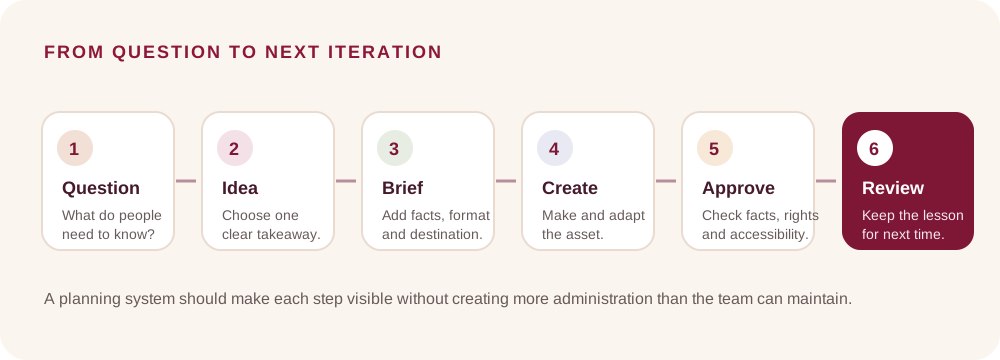
A lightweight weekly review can keep the calendar usable without turning planning into a meeting-heavy project. Start with five actions:
- Collect: Add new audience questions and confirmed business updates.
- Select: Choose only ideas that fit the month’s priority and production capacity.
- Assign: Name an owner and reviewer, then link the source material.
- Produce and approve: Prepare the brief and creative, check details, and resolve feedback before scheduling.
- Review: After publication, note a relevant signal and a question to investigate next.
The workflow shown in the diagram is intentionally simple. Smaller teams can combine roles, but the person responsible for a fact should be identifiable and the final approver should be clear.
Turn a calendar entry into a publishable brief
A calendar cell often holds only a headline or idea. Before production, turn it into a short brief that names the audience, purpose, takeaway, evidence, format and next step. Link to the exact service page, product details, approved quote or source that supports the post. If an important fact is missing, hold the claim for confirmation.
This step prevents a common handoff problem: a designer receives a vague topic and must guess the offer, audience or proof. The calendar coordinates the work; a brief gives each post enough context to make it accurate and coherent.
Adapt ideas to platforms; keep the work original
A central idea can be reused where it remains useful, but do not assume that the same crop, caption and call to action fit every destination. Check the audience context, format, link behavior, captions, safe areas, accessibility and account capabilities. Platform features and recommendations change, so review the current professional tools before scheduling.
Meta’s Instagram professional dashboard includes a Best Practices education area for creators. Meta’s Facebook guidance also explains how it assesses originality and meaningful creative contribution. These are platform-specific references, not guarantees about distribution, and the guidance may change. Use them to check current expectations while keeping the post useful to the audience. Meta: Instagram Best Practices · Meta: original content guidance for Facebook.
Repurposing can mean adapting one verified answer into a short clip, a carousel and a longer explanation. Each version should add value in its format, credit or license material appropriately, and avoid re-uploading someone else’s work as if it were original.
Check approvals, rights and accessibility before scheduling
Use a brief pre-publication checklist:
- Names, dates, prices, product details, eligibility, offer terms and availability have been verified by the right person.
- The destination link opens the intended page, and the next step is clear.
- Images, music, footage, testimonials and customer details have permission for the planned use.
- Informative images have descriptive alt text; spoken video has captions; on-image text is readable and contrast is sufficient.
- Disclosures or qualifications required for the content are visible and accurate.
- The approver has seen the final caption and asset, not just an early concept.
Keep a status such as “held for confirmation” in the calendar rather than publishing an unverified claim to meet a date.
Measure the purpose, not just the post
Choose one or two review signals that fit the post’s job. A practical explainer might be reviewed for saves, meaningful questions or clicks to a related page. A service post might be assessed through relevant enquiries and what the business learns during follow-up. An offer can be reviewed against the transaction system and the offer’s actual terms. Likes alone do not show whether a business goal was met.
Record the source, date range and definition beside the result. Platform insights, website analytics and sales records describe different parts of the customer journey and may not align perfectly. If tracking or review coverage is incomplete, say so. Use small samples as prompts for the next question, not as proof that one creative element caused a result. Our small business marketing report template explains how to connect channel evidence with outcomes and limitations.
Common social media calendar mistakes
- Overplanning: Too many posts create unfinished assets and rushed approvals. Reduce the plan to work the team can complete.
- Starting with a format trend: Choose the audience question first, then pick a format that explains it well.
- Leaving ownership vague: “The team” is not an owner. Assign a person for production and final approval.
- Scheduling unverified details: Confirm terms, price, availability, names and links close to publication.
- Using one version everywhere: Adapt the creative to the destination and audience rather than copying blindly.
- Scoring every post by likes: Evaluate the signal that matches the purpose and look at relevant customer feedback.
- Never revisiting the plan: Update postponed or no-longer-accurate posts, and carry one useful learning forward.
Frequently asked questions
How far ahead should a small business plan social media posts?
Plan far enough ahead to create and approve the work, while leaving room for timely updates. The right window depends on how quickly offers, stock, schedules and customer questions change.
How many times should a small business post each week?
There is no single weekly frequency for every business. Choose a cadence the team can sustain, then review post quality, audience response and the team’s ability to handle follow-up.
Is a social media calendar the same as a content brief?
No. The calendar coordinates dates, platforms and responsibilities. The brief explains what one post should communicate and what its creator needs to make it. The final caption and creative are the published materials.
Should every post include a sales call to action?
No. Match the next step to the post. An explainer can point to a related guide; an offer can point to accurate terms; a discussion post may invite a relevant question.
Can I publish the same post on Instagram and Facebook?
Sometimes, after checking context, format, audience, rights, accessibility and destination. Adapt the execution where needed and make sure the work adds value for the audience.
What is the simplest social media calendar template?
Start with date, platform, audience question, idea, owner, approval status, destination and review note. Add columns only when the team will keep them current.
A practical next step
Copy the calendar columns into a spreadsheet, add a few real audience questions, and plan a small batch the team can complete. Connect each row to a brief, source and clear approval owner. First Thought’s social media service covers planning and content production; if you want to discuss what fits your business, send us an enquiry.
Sources & further reading
Instagram: Best Practices for creators ↗Meta: Rewarding Original Creators on Facebook ↗First Thought: Social media content brief template ↗First Thought: Small business marketing report template ↗Search intent was checked against current public results on 16 October 2026. Search volume, Search Console queries and rankings were not available. The bakery example is fictional.