
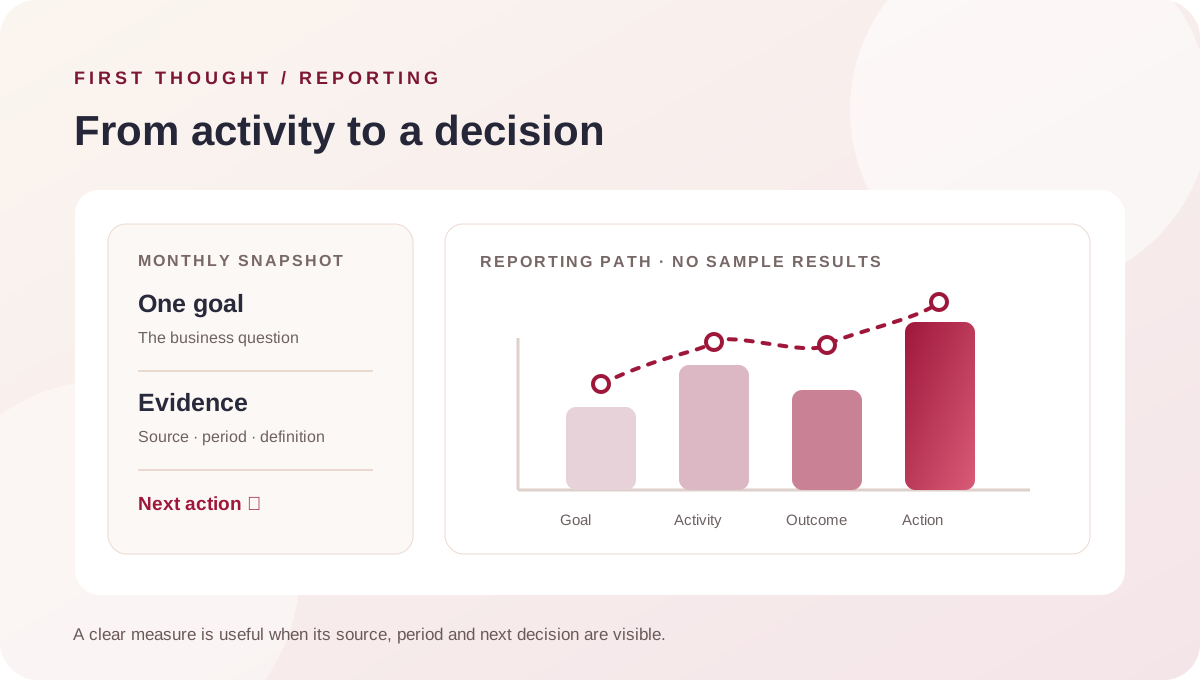
The short answer
A small business marketing report should connect a business goal to what happened, what the evidence can and cannot tell you, and what decision comes next. Start with the reporting period and one objective; summarise the work and spend; show a small set of channel and enquiry measures; include lead quality or sales feedback when available; then state one action, its owner and its review date.
A marketing report template is useful when it helps an owner make a decision. A longer list of platform metrics is not automatically a better report. If a number does not affect a decision, explain a result, or identify a tracking gap, move it out of the main summary.
What this monthly marketing report template helps you decide
Before opening an analytics dashboard, write down the question the report needs to answer. For example: “Are the enquiries from this campaign relevant enough to justify another month?” or “Which part of our website should we improve before we increase traffic?”
The question determines which data matters. A local service business may need to understand calls, form enquiries, qualified requests and follow-up. An online store may need to reconcile campaign activity with orders, refunds and contribution after costs. A business building awareness may instead need a consistent view of reach, branded searches, engaged visits and the next step toward demand. These are different reporting jobs; do not combine them into one score without a clear definition.
A copy-ready monthly marketing report structure
Use this order in a document, slide or spreadsheet. Keep the executive summary short, and put detailed campaign exports in an appendix.
| Section | What to record | Decision it supports |
|---|---|---|
| Reporting details | Business or campaign, dates covered, channels included, data owners and date prepared | Are we comparing the same scope and period? |
| Goal and target | One business objective and the target agreed before the period | What does “working” mean for this activity? |
| Executive summary | What changed, what is known, what is uncertain and the action requested | What should the owner decide now? |
| Investment and delivery | Spend or fees in scope, work delivered, creative or site changes and any interruption | What was actually done and what did it cost? |
| Channel results | A few channel-specific measures with definitions and source links | Which channel or step deserves investigation? |
| Enquiry or sales quality | Enquiries received, reviewed, qualified, progressed or closed, when reliably recorded | Did activity lead to conversations the business can use? |
| Learning and next action | One observation, the evidence behind it, an owner and a review date | What will change next, and how will we assess it? |
Do not label a target after the month ends. If no target was set, call the first reporting period a baseline and agree on a target for the next period. This keeps the report honest about whether it is assessing performance or establishing a starting point.
Follow the path from marketing activity to a business outcome
A channel dashboard describes activity inside that platform. A business report should connect activity to the steps the business can verify. The path below is a useful map for lead-generation work; a store or subscription business can replace the final steps with its own order or renewal events.
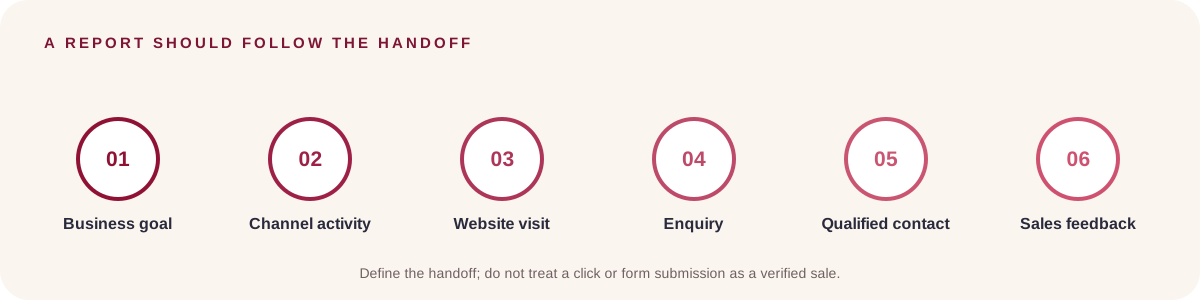
For each handoff, decide what counts and who records it. A “lead” might mean a submitted form in one dashboard and a phone call in another. “Qualified” should be defined by the business, not inferred from a click. “Sale” should come from the system that records completed transactions. If a step cannot currently be linked, show that gap instead of treating the previous step as the final result.
Choose a small set of marketing KPIs that fit the goal
A key performance indicator (KPI) is a measure selected because it helps assess progress toward a defined objective. It is not simply any number visible in a dashboard. Choose a few measures across the path, and state their source and definition beside them.
| If the goal is… | Useful measures to consider | Pair them with… |
|---|---|---|
| Search discovery | Search impressions, clicks, click-through rate and landing pages | Query or page context and the date range |
| Paid campaign learning | Spend, eligible interactions, configured conversions and conversion value when values are meaningful | The campaign goal and conversion settings |
| Website enquiry flow | Relevant sessions, completed enquiry actions and form or call quality | Form tracking checks and a review of real enquiries |
| Lead quality | Enquiries reviewed, qualified enquiries, follow-up status and stage reached | A clear qualification definition and reporting coverage |
| E-commerce sales | Orders, recorded revenue, refunds and costs included in the calculation | The transaction source, attribution view and margin limits |
Google Search Console Performance report includes clicks, impressions, click-through rate and average position; its help documentation explains how those metrics are counted. Average position is a summary, not a promise that every searcher saw the page at that rank. Google Analytics reports can summarise acquisition, engagement and other configured data. Google Ads conversion columns depend on the conversion actions and goals set up in the account. Read the platform's definition before comparing its “conversion” count with the business's CRM or order records.
Use formulas carefully, and keep the denominator visible
A spreadsheet can make the arithmetic repeatable. It cannot repair inconsistent definitions or missing tracking. Write each formula in the report and show the values used, so another person can reproduce the calculation.
- Click-through rate (CTR) = clicks ÷ impressions. Use the platform and placement that produced both values.
- Website enquiry rate = completed, tracked enquiries ÷ relevant website sessions. Confirm what counts as an enquiry and whether duplicate submissions are removed.
- Cost per recorded enquiry = eligible campaign spend ÷ enquiries assigned under the chosen attribution method. Name that method; platform-attributed totals can differ.
- Qualification rate = enquiries marked qualified ÷ enquiries reviewed. If some enquiries have not been reviewed, report the review coverage too.
- Cost per qualified enquiry = eligible campaign spend ÷ qualified enquiries recorded for that campaign and period. Treat it as unavailable when the denominator is zero or tracking is incomplete.
- Return on ad spend (ROAS) = attributed revenue ÷ advertising spend. ROAS describes revenue relative to ad spend; by itself it does not subtract product costs, fulfilment, agency fees, refunds or other overhead.
A practical spreadsheet has one row per reporting period and channel, with columns for: period, channel, campaign, spend, impressions, clicks or interactions, tracked enquiries, enquiries reviewed, qualified enquiries, sales or orders, attributed revenue, source system, attribution note, data owner and comments. Add formula columns only where the underlying data is available. Avoid filling empty cells with zero if the value is actually unknown; use a clear status such as “not tracked” or “pending reconciliation.”
Compare periods without hiding changes in scope
Month-on-month comparison is useful when the compared periods represent similar activity. Use the same date boundaries, channel definitions and conversion settings. Note changes such as a new landing page, a campaign pause, a different offer, a tracking correction or an incomplete month. If seasonality or sales cycles are relevant and a reliable comparison period exists, show it separately rather than presenting it as directly equivalent.
Search Console data is grouped and counted according to its reporting dimensions. Google explains that property-level and page-level views can aggregate results differently. Keep filters and grouping visible in your report; otherwise a chart may appear to contradict a table that uses a different scope. Record the export date for reports that may update after the reporting window.
Turn the chart into a useful explanation
Use one visual to answer one question. A trend line can show how a measure changes across periods; a bar chart can compare channels when the same definition applies; a funnel can show where handoffs are not recorded. Label the period, unit, source and denominator. Do not use a dual-axis chart to imply a relationship that the data does not establish.
Every chart should have a sentence beside it: “What changed?”, “What evidence supports that interpretation?” and “What should we do next?” If the answer is “we do not know yet,” say which measurement or business feedback is missing and assign someone to check it. A visually polished chart without a decision is decoration, not reporting.
Write the summary for a busy owner
A useful executive summary can follow four prompts:
- Goal: What was this period intended to achieve?
- Evidence: What changed in the measures that relate to that goal?
- Interpretation: What might explain the change, and what cannot yet be concluded?
- Decision: What action, approval or data check is needed next?
For example, a careful summary might say: “The campaign generated form submissions, but the team has not yet reviewed enough of them to assess fit. We should complete the lead review and verify form tracking before changing the budget.” This is a process example, not a report about First Thought or a client result.
Common monthly marketing report mistakes
- Reporting activity as an outcome: reach, clicks or posts published may be useful context, but they do not alone establish revenue or qualified demand.
- Mixing platform totals: separate platforms may use different attribution settings, event definitions and reporting windows. Do not add their conversion columns together without deduplication and a documented method.
- Changing the KPI after seeing the result: decide the measure before the reporting period or clearly mark the new measure as exploratory.
- Hiding missing data: distinguish zero from unavailable, delayed, untracked or not yet reviewed.
- Listing every metric: keep supporting exports available, but make the main report answer the agreed decision.
- Making a causal claim from a simple comparison: a result can move alongside a change without proving that the change caused it. State other relevant changes and what evidence is still needed.
Frequently asked questions
What should a small business marketing report include?
Include the reporting period, goal, work and investment in scope, a few goal-related channel measures, enquiry or sales feedback where available, tracking limitations and a named next action. The exact measures depend on whether the business is seeking discovery, enquiries, sales or another outcome.
How many KPIs should a monthly marketing report have?
There is no universal number. Start with the few measures needed to assess the chosen goal and explain a decision. Add a measure only when its definition, data source and use are clear.
Is a marketing report the same as an analytics dashboard?
No. A dashboard is often a live or frequently updated view of selected data. A marketing report adds a defined period, interpretation, business context, limitations and recommended action. A dashboard can supply evidence for a report.
Should I include impressions and likes?
Include them when they help answer the report's objective, such as assessing distribution or creative response. Pair them with the next meaningful step when that step is measurable. Do not present them as sales or lead quality.
Can I use platform-attributed conversions as my total sales?
Use them as the platform's reported conversion measure, with its settings and attribution context. Reconcile business sales against the system of record, such as a CRM or order database, before reporting a total. Differences should be explained, not averaged away.
How do I report marketing when conversion tracking is not ready?
Report verified activity and mark downstream outcomes as not assessed. Add a measurement task: define the important action, implement it with appropriate consent and testing, assign an owner, and establish a date to check whether the data is being captured correctly.
A practical next step
Start with one page and one reporting question. Agree on the goal, period, definitions and data owner before filling in numbers. If you need help connecting campaign activity with the website and enquiry handoff, explore First Thought's performance marketing service or contact the team.
Sources & further reading
Google Analytics: Reports in the Analytics app ↗Google Analytics: Campaigns and traffic sources ↗Google Search Console: Performance report overview and setup ↗Google Search Console: What impressions, position and clicks mean ↗Google Ads: Understand your conversion tracking data ↗First Thought: Before you scale lead generation, fix the handoff ↗First Thought: Google Ads vs Meta Ads for local leads ↗Practical frameworks are First Thought editorial recommendations. No campaign results or search volumes are claimed.