
The short answer: count real customer actions
Google Ads conversion tracking for a small business should record meaningful actions that happen after an ad interaction, such as a completed enquiry or a phone call that meets a business-defined qualification. Start by deciding what counts, which campaigns should optimise toward it, and how a person will confirm the event actually occurred. Then install the appropriate tag, test the full journey, and compare platform counts with the enquiries the business received. A form button click alone is not proof that a qualified lead reached your team.
This guide explains a practical setup for website forms and phone leads. Google Ads conversion actions and GA4 key events are related but distinct concepts, with different reports and settings. Treat this as an implementation checklist, not a promise of more leads or lower costs. The illustrative examples contain no First Thought campaign results.
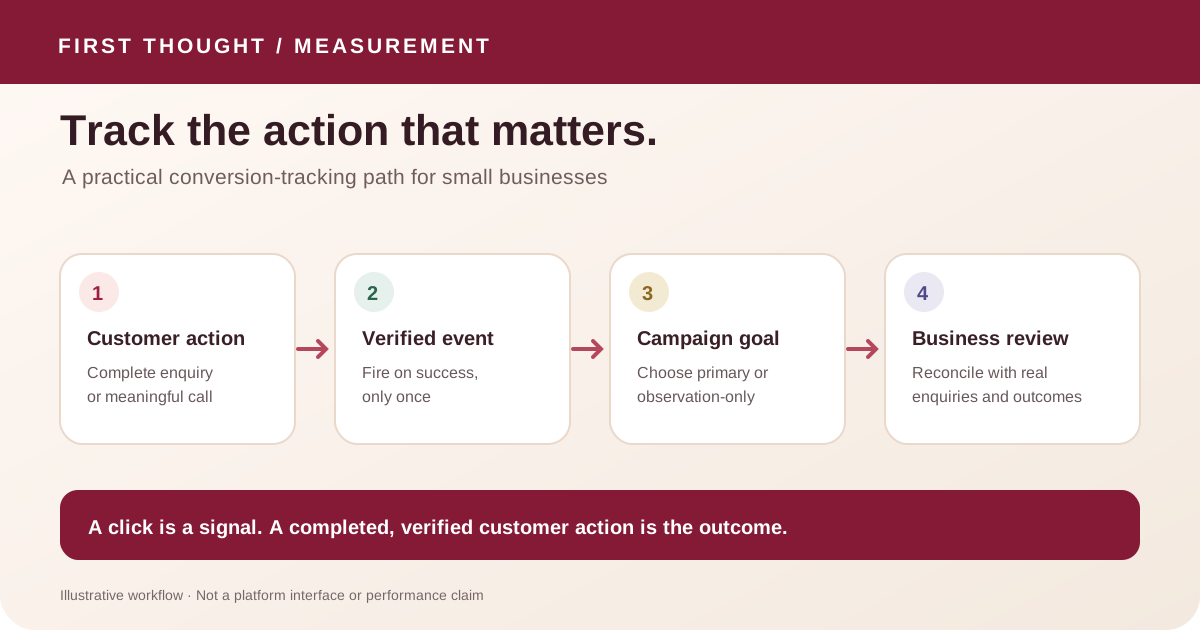
What Google Ads conversion tracking measures
A conversion action is a chosen customer action that the business wants to measure, such as a purchase, a submitted lead form or a phone call. Google Ads groups related conversion actions into goals. A conversion can be useful for reporting even when a campaign is not configured to use it for bidding.
In Google Analytics 4, an event records an interaction. A key event is an event the business has identified as important. Google’s documentation says an event must first exist or be set up before it can be marked as a key event. An event can then be used for reporting, and, where the account supports it, connected to a Google Ads conversion. Check the current account interface and property eligibility before relying on a specific workflow.
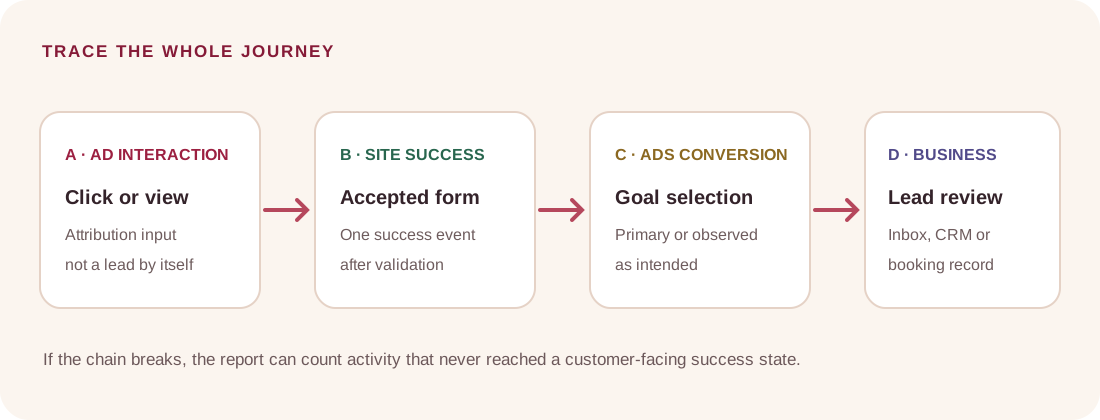
The names are easy to mix up, so write down the measurement chain:
- Customer action: what the person actually did, such as submitting a complete enquiry.
- Website event: the signal recorded after that action, such as
generate_leador a confirmation-page view. - Conversion action: the Google Ads action used for reporting and, if selected, bidding.
- Business outcome: what the team later confirms, such as a valid enquiry, appointment or sale.
Those four stages are related but not interchangeable. A click may fire an event; an event may be counted as a conversion; and a conversion may still be irrelevant to the business. Google’s conversion-goal guidance explains that primary actions can be used for bidding when the campaign uses the associated goal, while secondary actions are generally observed in “All conversions.” A primary setting alone does not mean every campaign is optimising for that action.
Decide what counts before installing a tag
Write a one-sentence definition for each action. For a lead form, it could be: “Count one conversion only after the website accepts a complete enquiry and displays its confirmation.” For a phone lead, it might be: “Count a connected call that meets our agreed duration or is later confirmed as relevant by the team.” These are example definitions, not universal rules. Choose a threshold based on how the business handles calls; do not pick a number solely because a platform suggests one.
Separate main outcomes from early signals. An enquiry submission, purchase or qualified phone call may be a main outcome. A visit to the contact page, click on an email link, start of a form, or download can help diagnose the journey, but may not be a good primary bidding signal by itself. If every small interaction is counted as a primary conversion, the report can look busy while saying little about customers.
| Customer path | Possible action to measure | Common measurement trap | Better check |
|---|---|---|---|
| Website enquiry | A completed form accepted by the site | Counting the submit-button click, including failed submissions | Verify the success state and confirm the enquiry reached its destination |
| Phone enquiry | An ad call or an eligible call from the website | Treating every phone-number tap as a completed conversation | Distinguish a click from a connected call; review call tracking eligibility and duration rules |
| Online order | A completed order with a transaction identifier | Firing the purchase event on the cart or confirmation page reload | Test one order journey and prevent duplicate transaction counts |
| Appointment request | A confirmed booking or a clearly defined booking request | Counting the calendar page view as a booking | Verify the final booking state and compare against the booking system |
| Contact-page visit | A diagnostic engagement event | Treating a visit as a lead | Keep it observational unless there is evidence it represents a meaningful outcome |
For each action, record the name, definition, trigger, owner, destination, primary/secondary choice, test method and known limitation. A blank worksheet is available in the conversion tracking worksheet CSV. It is a planning aid, not proof that a tag is installed.
A six-step setup for a small-business website
1. Trace the customer journey
Open the page a real customer would reach from the ad. Follow the path on a phone and a desktop browser where possible: landing page, form or call action, success state and handoff. Identify the system that receives the enquiry. If a submission is sent to email, a CRM, a spreadsheet or a booking tool, confirm which person can verify it arrived. Do not change campaigns until the business knows what its “lead” label means operationally.
2. Choose one trigger that represents completion
For a form, prefer a signal tied to accepted submission: a reliable confirmation page, a success callback or a data-layer event emitted only after the server accepts the enquiry. A generic click trigger can fire when required fields are missing, validation blocks submission, or a visitor taps twice. If the form uses an embedded third-party tool, confirm that the success state can be measured across that embed and that the integration does not expose personal data.
For a purchase, use the completed order state and an identifier or other deduplication method supported by the platform. A refresh should not create a second purchase conversion for the same order. For a booking, distinguish opening a scheduler from completing a slot reservation.
3. Select the implementation that fits the site
Google Ads supports website conversion tracking with a Google tag and also provides instructions for using Google Tag Manager. Choose one owner for the implementation and keep a written record of where the tag lives. Avoid installing the same event through multiple plugins, theme code and a tag manager unless the setup intentionally deduplicates it. Duplicate installation is a common source of inflated numbers.
If Google Analytics already records the desired event, review whether it can be marked as a key event and connected to Ads for the intended reporting or campaign use. Confirm the current feature is available in the property and check which interface controls the settings. Do not assume a GA4 event is automatically a Google Ads conversion, or that it appears in every GA4 report. Google documents separate reporting locations for Google Ads conversions.
4. Configure the conversion goal deliberately
Set the action as primary only if the business wants eligible campaigns to optimise toward it and has selected the associated goal for those campaigns. Use secondary observation for actions that are informative but should not guide bidding, subject to the current account configuration. Recheck campaign-specific goals as well as account defaults: a correctly created conversion action can still be excluded from a campaign’s bidding goal.
A reasonable lead-generation starting point might keep completed enquiries as the main outcome and use contact-page visits or form starts as diagnostic events. That is only an example. An ecommerce store, appointment-based practice and high-consideration service have different customer paths. Document the decision, the campaign goal that uses it and who can approve later changes.
5. Test the complete journey before trusting the report
Use Google Tag Assistant or the relevant platform diagnostics to confirm the tag fires on the intended page and event. Test a clearly labelled submission through the same steps a customer follows. Confirm that the success condition is real, the intended conversion is recorded once, and the team receives the test enquiry. Keep QA submissions out of real sales reporting where the tools allow it, and remove the test record through the agreed process.
Run negative checks too. Submit an invalid form, refresh the confirmation page, use the back button, and test a second action that should not count. The form should not record a completed lead when validation fails. A purchase should not count twice on reload. A call-button tap should not be reported as a connected call unless the chosen measurement method actually measures the call.
Tag diagnostics, browser previews and ad-platform status labels each answer different questions. A “tag detected” state does not prove the entire lead journey works, and one successful test does not prove every device or browser configuration works. Write down exactly what was tested, when, and what remains unverified.
6. Reconcile platform counts with business records
After launch, compare the conversion report with the enquiry inbox, booking system, order records or CRM for the same date range. Use the same definition and time zone where possible. Investigate differences instead of forcing the counts to match: attribution windows, consent choices, ad interactions, filters, delays, duplicate events and reporting definitions can produce different totals.
A small weekly review can use three columns: platform-reported actions, enquiries received, and enquiries reviewed as relevant. Add a note for missing follow-up or tracking issues. A simple illustrative row might read: “Ads reported 8 form actions; the inbox held 6 matching records; 2 could not be matched; relevance review pending.” These figures are made-up solely to show the format and are not First Thought or client data.
Measuring phone calls without overstating them
Google Ads documents different phone measurement paths, including calls directly from an ad, calls to a number shown on a website, phone-number clicks, and imported call outcomes from another system. They do not observe the same thing. A click on a tel: link tells you someone tapped a number; it does not establish that a call connected or that a conversation was useful.
Website call conversion tracking may use a Google forwarding number and requires an eligible setup, a Google tag and a phone snippet. Google’s documentation notes that country availability and implementation requirements apply. Check eligibility for the business’s country and phone setup before enabling it. If the business already uses dynamic number insertion or a third-party call-tracking provider, coordinate with that provider before adding another number-replacement script. Two systems replacing a phone number can create a broken display or unreliable attribution.
A call-duration threshold can filter out some short calls, but duration alone does not prove a good lead. A long call can be support, an existing customer or the wrong service request. If call outcomes are recorded in another system, assess whether an approved offline-import workflow is appropriate. Keep the choice proportionate to team capacity and applicable privacy requirements.
A weekly lead-quality review that fits a small team
A useful review does not require a large analytics project. Choose one consistent week or month, agree on the date range, and make a small reconciliation table. Keep platform totals, received enquiries, and reviewed outcomes in separate columns. Record what is known and leave unmatched rows marked “pending” instead of assuming every platform conversion is a valid prospect.
For example, the owner can review a sample of enquiry records and label them as relevant, duplicate, existing-customer support, spam, or unclear. Use categories the team actually understands. The point is to learn whether the measurement definition matches the customer journey, not to expose personal information in an analytics report. Keep identifiable contact details in the business system that needs them, and share only aggregated or appropriately protected counts in the measurement review.
When the counts differ, investigate in a fixed order: confirm both reports use the same date range and time zone; check whether the conversion is counted once or imported from more than one source; inspect the form success trigger; then review attribution and consent settings. Write down the finding and the next owner. Do not “correct” one platform’s total by changing the event definition until you know why it differs.
A short change log also helps. Record the date, setting changed, reason, person responsible and test performed. If a conversion action changes from secondary to primary, note which campaigns use the associated goal and when the change becomes effective. This makes a later performance review more useful because the team can distinguish an actual campaign change from a measurement change.
Avoid these tracking mistakes
- Counting clicks as outcomes. A contact-page view or submit-button tap is not the same as an accepted enquiry.
- Firing the same event twice. Check both the site code and tag manager before adding another tag.
- Optimising toward noisy signals. Review primary/secondary settings and the goals selected in each campaign.
- Leaving test activity in live reports. Label QA submissions and document how they are excluded or identified.
- Putting personal details in event parameters or URLs. Google Analytics policy says not to send personally identifiable information such as email addresses or personal mobile numbers. Do not pass names, phone numbers, email addresses or form messages in page URLs, event names or analytics parameters.
- Changing several controls at once. If the campaign goal, tag and landing page all change on the same day, later investigation becomes harder. Record changes and test each one.
- Treating a platform conversion as a sale. Keep platform measurement separate from confirmed business outcomes unless the sale or qualified result is actually connected.
A practical handoff checklist
Before calling tracking ready, make sure the owner or implementer can answer these questions:
- What exact customer action is counted?
- What page or event triggers it, and does it happen only after success?
- Is the tag installed once and tested with current diagnostics?
- Does the conversion action use the intended primary or secondary setting?
- Does the campaign include the goal it is expected to optimise toward?
- Are phone-click, connected-call and qualified-call signals clearly distinguished?
- Can the business match some platform actions to actual records without sharing unnecessary personal data?
- Who owns the setup, who approves changes, and when is it reviewed?
If one answer is unknown, mark that part pending. “Tracking installed” is not a useful status when the trigger, receiving system or test result is unclear.
Frequently asked questions
Is Google Ads conversion tracking free?
Google does not charge a separate platform fee for creating a conversion action, but implementation can require staff or developer time and other tools. Phone-tracking features have eligibility and setup conditions. Confirm current requirements and any third-party costs before choosing an implementation.
Should I use Google Ads or GA4 to track leads?
They can serve complementary purposes. GA4 events help describe interactions on the website, while Google Ads conversion actions support Ads reporting and, when configured, bidding. Decide which platform owns each event, avoid duplicate imports, and validate how the event appears in each report.
Should a contact-page visit be a primary conversion?
Usually it is more useful as a diagnostic signal than as the main lead outcome, because a visit does not prove a person contacted the business. The correct choice depends on the sales journey and available data. State the reason before making it a bidding goal.
Can I count phone-number clicks as calls?
You can measure clicks on a phone link, but that records a tap rather than a connected conversation. Google Ads provides separate methods for calls from ads and website calls, each with its own availability and technical conditions. Name the event accurately so a click is not mistaken for a call.
Why do Google Ads and GA4 show different conversion totals?
The platforms can use different event definitions, attribution settings, reporting windows, consent signals, filters and processing. Compare the same date range and action, inspect the configuration, and reconcile against business records. Do not assume one platform’s number is the universal source of truth for every question.
How do I know whether a lead conversion tag works?
Test the full customer journey, confirm the success trigger fires once, check the platform’s diagnostics, and verify the enquiry reaches its intended destination. Then compare reported actions with actual records over a defined period. Mark any untested devices, forms or call routes as pending.
Make the next campaign decision measurable
Good conversion tracking starts with a clear definition and a working handoff, not a larger event list. Define the outcome, connect it to the right goal, test the journey, and review platform counts alongside real enquiries. If you are preparing a paid campaign, bring the offer, landing page, form flow and measurement plan together before deciding what to optimise. See our Google Ads vs Meta Ads guide and small-business marketing report template, or discuss your goals with First Thought.
Sources & further reading
Google Ads Help: About conversion goals ↗Google Ads Help: Set up your Google tag ↗Google Ads conversions — Tag Manager Help ↗Google Ads Help: Measure calls from ads ↗Google Ads Help: Track calls to a phone number on a website ↗Google Analytics Help: Mark events as key events ↗Google Analytics Help: Best practices to avoid sending PII ↗Practical frameworks are First Thought editorial recommendations. Hypothetical examples are not client results.