The short answer
To automate WhatsApp Business messages with AI, pick one repeated job, write down the facts the AI may use, connect the WhatsApp Business Platform (the official API) to an AI tool through a provider, set rules for when a person takes over, get message templates approved, and test on real customer questions before going live. The free WhatsApp Business app only does greetings and away messages.
Most of the work is not the tool. It is the job you choose, the facts you give it and the review after launch.
Key takeaways
- The free WhatsApp Business app offers a greeting message and an away message, while AI replies need the WhatsApp Business Platform, which you usually reach through a provider.
- Meta's rules decide what you can send: you may reply freely inside a 24-hour customer service window, and outside it only an approved template message is allowed.
- Meta's WhatsApp Business terms have barred general-purpose AI assistants since 15 January 2026, but AI built for support, sales, bookings and notifications on your own business is still allowed.
- Meta charges per delivered message again since 1 October 2026, after the first 1,000 service messages a month per number, so a busy AI reply bot now has a messaging line in its budget.
- A narrow pilot with one job, a clean facts sheet, a hand-over rule and weekly review beats a "do everything" bot, and Gartner expects more than 40% of agentic AI projects to be cancelled by the end of 2027.
What can you automate on WhatsApp, and what should you leave to people?
You can automate the first reply, simple questions, lead capture, booking and reminders, and you should leave negotiation, complaints and anything sensitive to a person. The test is whether the answer can be written down in advance from facts you already have.
| Good to automate | Keep with a person |
|---|---|
| Greeting and "we will reply by 10 am" at night | Price negotiation and discounts |
| Opening hours, address, fees, course or product details | Complaints and refunds |
| Collecting name, need, budget and preferred time | Anything involving health, money or legal terms |
| Booking a visit, demo or counselling slot | Cases the AI is unsure about |
| Appointment and order reminders (approved templates) | Messages to upset or high-value customers |
Respond.io's reading of Meta's policy lists FAQs, bookings, order tracking, support, notifications, appointment reminders, sales and lead qualification as allowed uses of AI on the platform. That is a vendor's reading of the rules, so confirm anything unusual with your provider.
Which route should you choose: Business app, no-code tool or custom build?
Choose the Business app if you only need greetings and away messages, a no-code platform to test one AI job quickly, and a custom build when the agent must work with your own systems. All three can work; they differ in control and effort.
| Route | What you get | Good when | Watch out for |
|---|---|---|---|
| WhatsApp Business app | Greeting message, away message | A few chats a day, one person replying | No AI answers; one phone to manage |
| No-code platform on the official API | Chat inbox, flows, AI assistant, templates | You want a pilot in weeks without developers | Monthly platform fee on top of Meta charges; limited control |
| Custom AI agent | Your logic, your systems connected | CRM, bookings or stock must be read and written | Higher build and upkeep; needs testing |
The WhatsApp Business app page mentions greeting people the moment they start a conversation and responding when you are away, and it states no AI features. If you want a real AI reply, you move to the Platform.
If you are not sure what an agent is, read what AI agents are and how they work first. For money, see our WhatsApp Business API cost guide for India.
How do you automate WhatsApp Business messages with AI, step by step?
You work through seven steps in order: job, route, number and access, facts, AI and rules, templates, then testing. Skipping the early steps is why many bots disappoint.
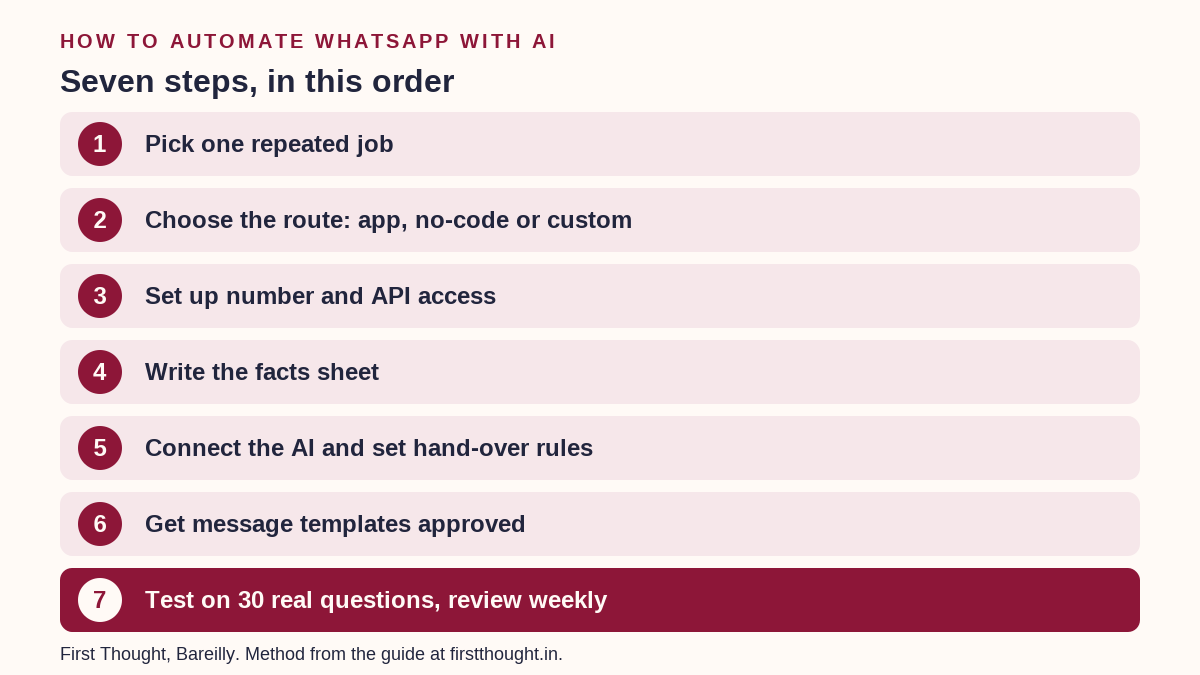
Step 1: Pick one job
Start with one job that repeats several times a week and has a clear end, such as "answer admission fee questions and book a counselling slot". Write the steps on one page. If you cannot, the job is too vague for AI.
Step 2: Choose your route
Use the table above. For most small businesses the practical answer is a no-code platform on the official API for the pilot, and a custom build only if the agent must read or write your own systems.
Step 3: Set up a number and access
AI replies run on the WhatsApp Business Platform, which needs a business phone number, a WhatsApp Business Account and, in practice, a provider that connects it to your AI tool. Plan for a separate business number, and ask your provider what happens to an existing WhatsApp number before you move it. Business verification and display-name approval take time, so start them first.
Step 4: Write the facts sheet
The AI is only as good as the facts you give it. Put these in one sheet or document: services or courses, prices or fee ranges you are happy to share, timings, address, policies, common questions in Hindi, English and Hinglish, and the things it must never answer.
MyOperator reports, from its own June 2026 platform data, that agents with more than 10,000 characters of instructions got 12 times the engagement per user of agents with under 2,000 characters. That does not prove the instructions caused it, but it fits common sense: a thin brief gives thin answers.
Step 5: Connect the AI and set the rules
Connect the AI to your WhatsApp number through your provider and give it three things: the facts sheet, the job and the rules. Good rules are short and specific:
- Answer only from the facts sheet. If the answer is not there, say you will check and call a person.
- Never promise results, discounts, refunds or dates.
- Ask for the customer's name and need before booking.
- Hand over to a person when the customer is angry, asks for a person, or asks twice and is still unsatisfied.
- Reply in the customer's language: Hindi, English or Hinglish.
A no-code tool like Pabbly's guide shows how to upload a knowledge file and activate an assistant in five steps, and it also says a paid OpenAI account is needed. Whichever tool you pick, check what it needs and what it costs before you commit.
Step 6: Get message templates approved
Templates are the pre-approved messages you can send outside the 24-hour window, such as a reminder or a follow-up. Meta's template documentation says each template is classed as authentication, marketing or utility, must be approved before sending, and that review "can take up to 24 hours". Write your reminder and follow-up templates early so they are ready on launch day.
Step 7: Test, launch small and review every week
Test with 30 real customer questions, including rude ones, vague ones and ones outside your scope, and read every answer. Go live for a limited group first. In the first month a person reads the conversations daily, corrects the facts sheet and writes down every wrong answer.
How do the 24-hour window and templates affect automation?
They decide when your bot can speak first. Meta's pricing documentation says a 24-hour customer service window starts when a user messages or calls you, and it resets if they message again before it ends. Inside that window you can reply freely, including with AI.
Outside it, the template documentation says template messages are the only type that can reach a user. So an AI cannot send a free-form follow-up three days later. It can send an approved template, such as "Your visit is booked for Saturday 11 am. Reply YES to confirm."
Two practical rules follow. Design your AI conversations to finish in one sitting, and plan follow-ups as templates. Also remember that only people who have agreed to hear from you should get proactive messages; Meta's template documentation says the category also affects pricing.
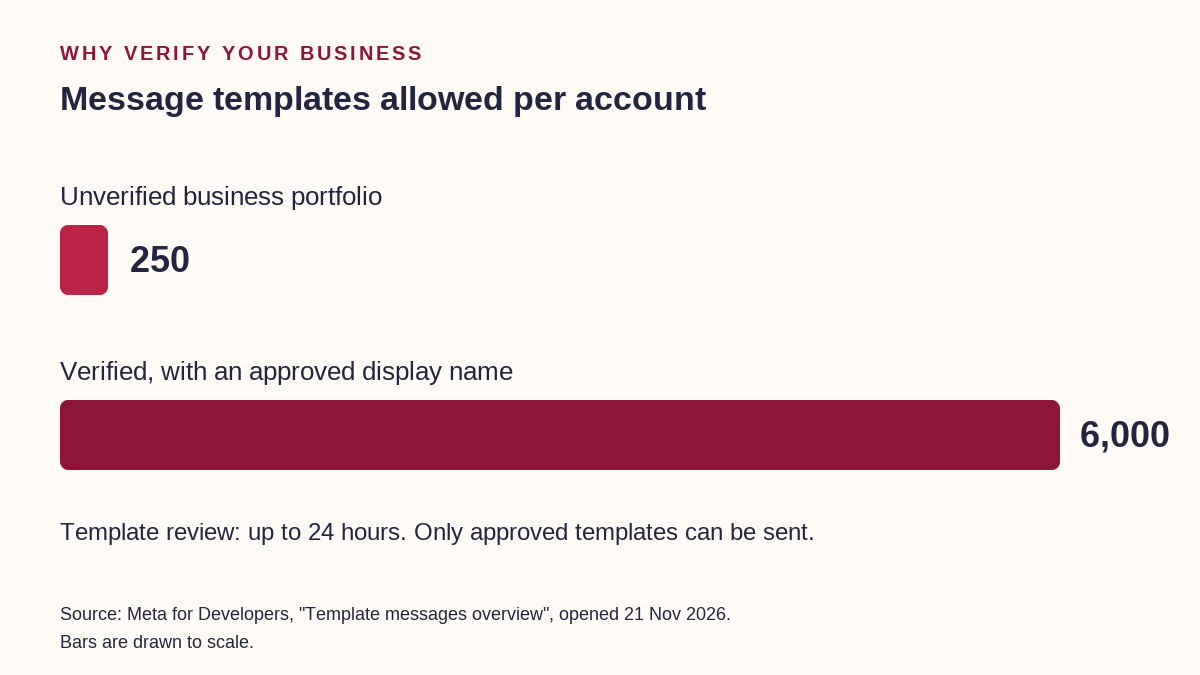
The chart shows another reason to complete business verification: Meta's template documentation sets a limit of 250 templates per messaging account for an unverified business portfolio, and up to 6,000 for a verified one with an approved display name.
What does Meta's AI policy allow in 2026?
Meta's WhatsApp Business terms bar general-purpose AI assistants from the platform, but allow AI that serves customers of your own business. TechCrunch reported on 18 October 2025 that Meta added an "AI providers" section to the terms, effective 15 January 2026, aimed at companies whose AI model is the product. Meta said a travel company running a customer service bot would not be barred.
For you this means: a bot that answers questions about your school, clinic or shop is fine. Do not set up a bot that answers anything on any topic, like a general chat assistant. Meta decides in its sole discretion what counts, according to the same report, so ask your provider how they stay within the terms.
How much does it cost to run?
It has four parts: the platform or provider fee, the AI model usage, Meta's per-message charges and your team's review time. Meta's pricing page says every business phone number gets a free tier of 1,000 service messages a month, and that charging resumed per message on 1 October 2026 for service messages and utility messages inside the window that were earlier free. Rates depend on message category and country, and Meta may change them only on the first day of a quarter.
We do not list rupee figures here because rates and provider fees change. Our cost guide has the current Indian numbers with sources, and our AI agent cost guide covers the build side. Eligible Indian accounts also need to migrate to INR billing by 31 December 2026 according to Meta's page, so check your provider has done it.
How do you keep customer data safe?
Tell customers what you collect and why, store only what you need, and make sure your provider and AI tool handle chats carefully. India's Digital Personal Data Protection Rules were notified on 14 November 2025, according to SCC Online's summary. The consent notice must be in clear, simple language, separate from other information, and say what data is processed and why.
SCC Online says most of the rules, including notice, security, breach notification and children's data, take effect eighteen months after publication. That means you have time, but your WhatsApp setup should not collect data you cannot explain. Ask any vendor where chats are stored and who can read them. If you serve students, ask for a parent's consent before storing a child's details, as the rules require verifiable consent for children's data.
Example: how a Bareilly builder could automate site-visit enquiries
This example is illustrative, with assumed numbers, and not a real client result.
A small builder in Bareilly gets enquiries on WhatsApp from property listings and Instagram ads. Most come after 7 pm and wait until the next morning. Some buyers have already messaged another builder.
| Step | What the builder sets up |
|---|---|
| Job | First reply, project details and booking a site visit |
| Route | No-code platform on the official API, one dedicated number |
| Facts sheet | Project name, unit types, starting-price range the builder is willing to share, location, RERA details, visit timings |
| Rules | No price promises, no loan or legal advice, hand over on "negotiation" or "booking amount" |
| Templates | "Your visit is booked for Saturday 11 am" and "We could not reach you; reply to rebook" |
| Review | The sales head reads the chats each morning for four weeks |
| Measure | Share of enquiries answered within 5 minutes, visits booked, wrong answers found |
The AI never quotes a final price or promises availability. The builder judges the pilot after four weeks on those numbers and decides whether to widen it.
Common mistakes to avoid
- Starting with a tool, not a job. A login and a template library do not tell you what the bot should do.
- Moving your only number without a plan. Ask your provider what happens to the existing chats and the normal app before you switch.
- Letting the AI answer from memory. Give it your facts sheet and tell it to say "I will check" when it does not know.
- No hand-over. Decide in writing when a person takes over, and make sure someone is there to answer.
- Sending to people who never asked. Proactive messages need consent and approved templates. Buying lists and blasting them risks your number.
- Counting replies instead of resolved enquiries. MyOperator makes the same point: measure whether the customer's problem was solved, not just how fast the bot replied.
- Setting it up once and forgetting it. Prices, timings and offers change; the facts sheet must change with them.
- Not testing in Hindi and Hinglish. Test the way your customers actually type.
How do you know it is working?
Track four numbers every week: how many enquiries the AI handled, how many it resolved without a person, how many it handed over, and how many wrong answers you found. Compare with your numbers from before: reply time, missed enquiries and hours spent.
- [ ] One job, one number, one person who reviews.
- [ ] Facts sheet updated this week.
- [ ] Wrong answers from last week fixed in the instructions.
- [ ] Hand-over cases read and, where possible, turned into rules.
- [ ] Templates still approved and still accurate.
- [ ] A clear yes or no on widening the pilot after four weeks.
A practical next step
First Thought, a digital marketing and creative agency in Bareilly, Uttar Pradesh, builds AI agents and WhatsApp automations for businesses across India and runs its own office on them. We start with one job you do every week, test the agent on your own sample messages and keep a person's approval in the loop. We do not promise a saving before we have seen your volume. To talk it through, see our AI agents service and message us on WhatsApp or through the contact page.
Frequently asked questions
Can I automate WhatsApp Business messages for free?
Partly. The free WhatsApp Business app lets you set a greeting message and an away message. AI replies need the WhatsApp Business Platform, which usually means a provider fee and Meta's message charges after the first 1,000 free service messages per number each month.
Do I need the WhatsApp Business API to use AI?
Yes, for real AI replies you need the WhatsApp Business Platform, the official API, normally through a provider. The Business app has no AI answering. Check the provider's fees and the AI tool's needs before choosing, because some tools also need a paid account with an AI model company.
Is it allowed to use an AI chatbot on WhatsApp?
Yes, if the AI serves your own customers. Meta's terms, in force since 15 January 2026, bar general-purpose AI assistants, but support, sales, booking and notification bots for a business are still allowed. Meta decides what counts, so confirm your setup with your provider.
Can the AI message customers first?
Only with an approved template, and only to people who agreed to hear from you. Inside the 24-hour window after a customer writes, you can reply freely. Outside it, Meta allows template messages only, which are reviewed before use and can take up to 24 hours.
How long does it take to set up?
A narrow pilot can be tested within weeks. Time depends on business verification, template approval, how ready your facts sheet is and how many systems connect. Plan at least one month of daily review after launch, since real conversations reveal gaps your first instructions missed.
Will the AI understand Hindi and Hinglish?
Modern AI models usually handle Hindi, English and Hinglish, but quality varies by tool and topic. Test with 30 real messages typed the way your customers write, including spelling mistakes, and fix the facts sheet where answers go wrong before you go live.
What should I do first?
Pick one repeated job, such as answering fee or price-range questions, and write the steps on one page. Then list the facts the AI may use and the cases a person must handle. Only then compare tools and providers.
Sources and further reading
- Meta for Developers, "WhatsApp Business Platform pricing" (updated 2026): https://developers.facebook.com/docs/whatsapp/pricing/
- Meta for Developers, "Template messages overview": https://developers.facebook.com/documentation/business-messaging/whatsapp/templates/overview
- TechCrunch, "WhatsApp changes its terms to bar general-purpose chatbots from its platform" (18 October 2025, updated 15 January 2026): https://techcrunch.com/2025/10/18/whatssapp-changes-its-terms-to-bar-general-purpose-chatbots-from-its-platform
- respond.io, "Not All Chatbots Are Banned: WhatsApp's 2026 AI Policy Explained": https://respond.io/blog/whatsapp-chatbot-policy-2026
- WhatsApp Business, "WhatsApp Business app" (2026): https://whatsappbusiness.com/products/business-app/
- SCC Online, "Digital Personal Data Protection Rules 2025: key highlights" (26 December 2025): https://www.scconline.com/blog/post/2025/12/26/digital-personal-data-protection-rules-2025-key-highlights/
- MyOperator, "AI Agents in Indian SMBs: What 200+ AI Deployments Reveal" (October 2026): https://myoperator.com/blog/how-indian-smbs-use-ai-agents-2026-myoperator-deployments
- Pabbly, "How to Automate WhatsApp Messages with AI (Step-by-Step)": https://www.pabbly.com/how-to-automate-whatsapp-messages-with-ai-step-by-step/
- Reuters via The Star, "Over 40% of agentic AI projects will be scrapped by 2027, Gartner says" (25 June 2025): https://www.thestar.com.my/tech/tech-news/2025/06/25/over-40-of-agentic-ai-projects-will-be-scrapped-by-2027-gartner-says
Sources and further reading
Meta for Developers, "WhatsApp Business Platform pricing" (updated 2026) ↗Meta for Developers, "Template messages overview" ↗TechCrunch, "WhatsApp changes its terms to bar general-purpose chatbots from its platform" (18 October 2025, updated 15 January 2026) ↗respond.io, "Not All Chatbots Are Banned: WhatsApp's 2026 AI Policy Explained" ↗WhatsApp Business, "WhatsApp Business app" (2026) ↗SCC Online, "Digital Personal Data Protection Rules 2025: key highlights" (26 December 2025) ↗MyOperator, "AI Agents in Indian SMBs: What 200+ AI Deployments Reveal" (October 2026) ↗Pabbly, "How to Automate WhatsApp Messages with AI (Step-by-Step)" ↗Reuters via The Star, "Over 40% of agentic AI projects will be scrapped by 2027, Gartner says" (25 June 2025) ↗The frameworks here are our own recommendations. Any example is an illustration, not a client result.